
Most Amazon sellers know what they sold yesterday, but few know their Amazon net profit per SKU: the money each product leaves them after every cost. Sales show up in Seller Central every morning. The real profit shows up weeks later, if it shows up at all, and by then you have often reordered the product already.
That delay is expensive. A product can sell well for months and still lose money on every unit, while your better products cover the loss without anyone noticing.
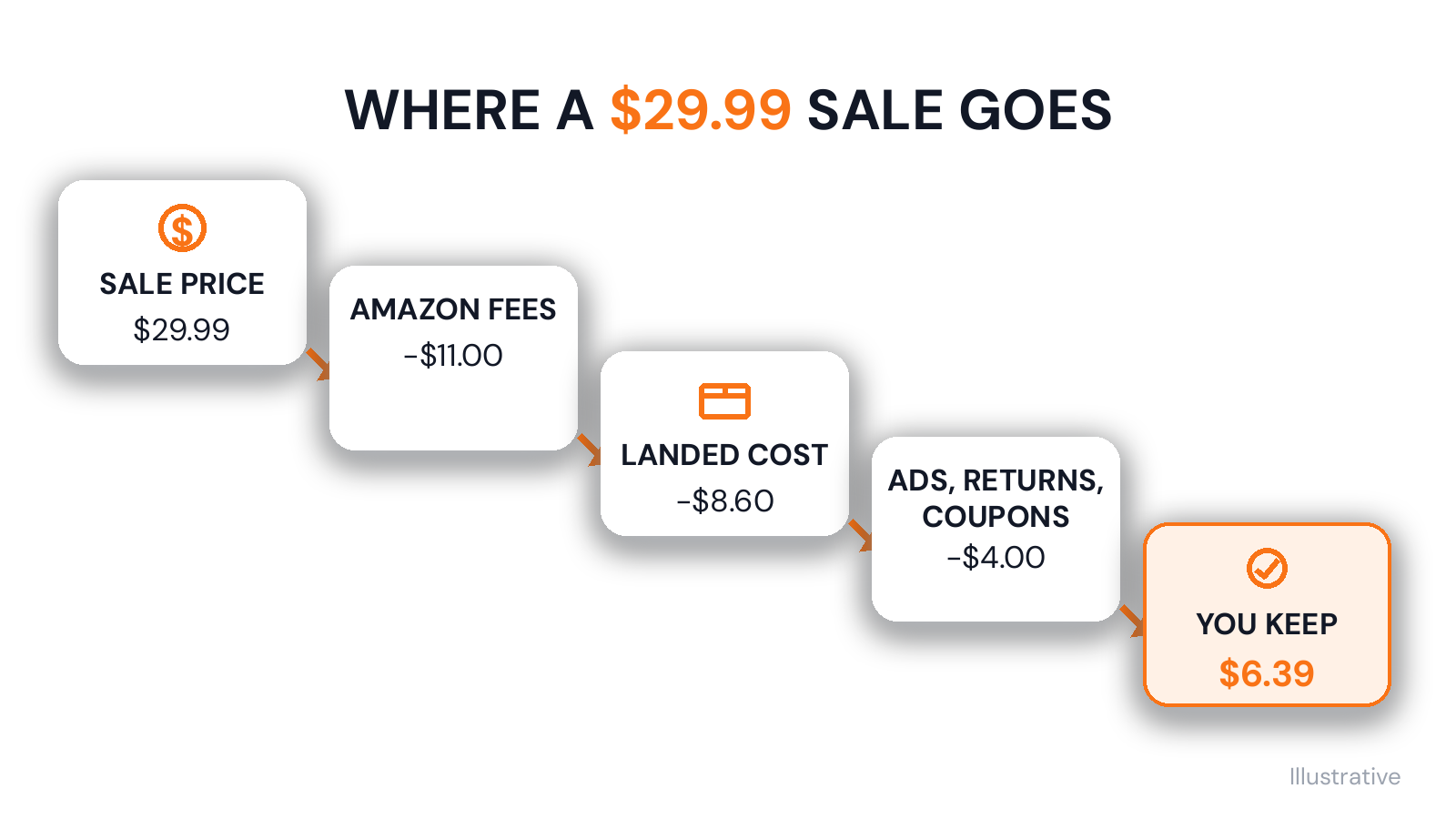
In this guide, we follow one $29.99 sale from the moment a customer pays to the amount you keep. We go through every cost using Amazon's 2026 fee rules and add it all up. Then we compare two products side by side and look at the mistakes that make the number wrong.
What Amazon Net Profit per SKU Means
Net profit per SKU is what one product earns after every cost tied to it. You can work it out for one unit or for a month of sales, and you need both. The unit number tells you if the product makes money at all. The monthly number tells you how much it adds to the business.
Three numbers often get mixed up here:
- Sales: what customers paid. This is the big number Seller Central shows first.
- Payout: what Amazon sends you after taking its fees. It can look like profit, but you still have to pay for the product, the freight and the ads.
- Net profit: what is left after all of that, including the costs Amazon never sees.
Amazon's reports are built around your sales and Amazon's own fees. Your supplier invoice, your freight bill and your prep centre's charges live somewhere else. So the payout is not your profit, and you have to bring the other costs in yourself.
Why work it out per SKU instead of for the whole account? Because the account total is an average. A few strong products can make several weak ones look fine. Per SKU, you can see which products to reorder, which to reprice and which to stop buying. It is your Amazon profit and loss, one product at a time.
The formula is short:
Net profit per unit = sale price − Amazon fees − landed cost − ad cost − returns − promotions
Net profit for the month = net profit per unit × units sold
The hard part is the middle of the first line. The next section goes through each of those costs in turn.
The Cost Stack: Fees, Product Cost, Ads, Returns, Promotions and Storage
Start with the Amazon fees breakdown, because Amazon takes those costs before the money reaches you. Then add the costs that sit outside Amazon. We use the same $29.99 product all the way through. The fee rules come from Amazon, but the amounts for this product are made up, so check your own fees in Seller Central.
Referral fee. This is Amazon's commission on each sale. It is a percentage of the total price, including any shipping and gift-wrap charges, or a minimum amount, whichever is higher. The rate depends on the category. For Home and Kitchen, Amazon's pricing page lists a 15% referral fee with a $0.30 minimum. On a $29.99 sale, that is $4.50.
FBA fulfillment fee. This pays for picking, packing and shipping each order, plus customer service and returns handling, as Amazon's page on FBA costs explains. The amount depends on the size and weight of the product, and it changed more than once this year. On 15 January 2026, FBA fees rose by an average of $0.08 a unit. From 17 April 2026, Amazon also added a 3.5% fuel and logistics surcharge to fulfillment fees. For our product, the fee is $5.80, which the surcharge takes to $6.00.
Holiday peak fee. From 15 October 2026 to 14 January 2027, Amazon adds holiday peak fulfillment fees that average $0.32 a unit, with the 3.5% added on top. We leave it out of the main example and come back to it later. Our Q4 inventory planning checklist covers the other holiday dates.
Storage. Amazon charges a monthly fee based on how much space your stock takes up. Items stored for more than 181 days also pay an aged inventory surcharge, as listed on the same FBA costs page. To get a cost per unit, divide the product's storage charge for the month by the units you sold. For our product, that is $0.20.
Inbound placement. If you send a shipment to fewer Amazon warehouses and Amazon spreads it out for you, it charges an inbound placement fee, also listed on the FBA costs page. Divided across the units in the shipment, our product pays $0.30.
Together, these four Amazon fees come to $11.00 on our $29.99 sale. The next costs never appear in Amazon's reports.
Landed cost. This is the full cost of getting one unit to Amazon: the supplier price, plus freight, duty, prep and labels. Many sellers use only the supplier price, which makes every product look better than it is. Our product costs $7.00 from the supplier, freight and duty add $1.20, and prep adds $0.40, so the landed cost is $8.60. Our guide to landed cost goes through each part.
Ads. Take everything you spent on ads for the product in the month and divide it by all the units you sold, including the sales that did not come from ads. That gives you the ad cost each unit has to carry. Our product spent $1,200 and sold 400 units, so each unit carries $3.00. For the holiday weeks, our post on Black Friday ad profit shows how to check this every day.
Returns. A return can cost you in more than one way. Amazon charges a returns processing fee on orders where it gives the customer free return shipping, and some returned units cannot be sold again. Add up what returns cost you in the month and divide by the units sold. For our product, that is $0.50 a unit.
Promotions. A coupon or deal costs you the discount you give away. Deals also carry their own fees. For Best Deals, Lightning Deals and Prime Exclusive Price Discounts, Amazon's holiday post lists $100 per promotion plus 1.5% of promotional sales, with the 1.5% part capped at $5,000. For our product, a $2 coupon used on 100 of the 400 orders costs $200, which is $0.50 a unit.
What to leave out. Some costs belong to the whole business, not to one product. Your selling plan, software, rent and salaries are examples. Take them off the total at the end of the month instead. If you spread them across every product, all of your products look worse by the same amount, and it gets harder to see which ones are the problem.
That makes eight or nine numbers for every product, and most of them change from one month to the next.
Worked Example with One Product
Here is the $29.99 sale with every cost in one place.
Cost line | Per unit |
|---|---|
Sale price | $29.99 |
Referral fee (15%) | −$4.50 |
FBA fulfillment fee, with 3.5% surcharge | −$6.00 |
Inbound placement | −$0.30 |
Storage | −$0.20 |
Landed cost (product, freight, duty, prep) | −$8.60 |
Ads ($1,200 ÷ 400 units) | −$3.00 |
Returns | −$0.50 |
Coupon | −$0.50 |
Net profit per unit | $6.39 |
The product keeps $6.39 from every $29.99 sale. That is a net margin of about 21%, or 21 cents from every dollar of sales. Over a month of 400 sales, it makes $2,556.
Now compare that with the number many sellers work from. A quick costing sheet often takes the price and subtracts the referral fee, the FBA fee without the surcharge, and the supplier price: $29.99 − $4.50 − $5.80 − $7.00 = $12.69. Each of those numbers is correct, but the sheet leaves out freight, prep, storage, ads, returns, and the coupon. The real profit is about half of what the sheet shows.
The holiday weeks take it lower again. With Amazon's average peak fee of $0.32 a unit plus the 3.5% surcharge, this product keeps about $6.06 a unit until 14 January.
Is 21% good? That depends on your category, your price, and how much you spend on ads. Our post on profit margin benchmarks covers what to compare it with.
How to Work Out Net Profit for Your Own Products
You can do the same sum for any product with numbers you already have. Pick one month and one SKU, then work through these steps:
- Note the units sold and the sales for that SKU in the month.
- Add up Amazon's fees on those orders. Your Seller Central payment reports show the referral fee and FBA fee on each order. Add the product's storage and placement charges for the month.
- Work out the landed cost per unit from your latest purchase order. Take the supplier price, freight, duty and prep for the whole order and divide by the number of units in it.
- Find the product's total ad spend for the month in your ad reports.
- Add up what returns and promotions cost for the product that month.
- Subtract all of these costs from the sales, then divide by the units sold to get net profit per unit.
Start with your ten best sellers by sales. They bring in the most money, so a wrong number there costs you the most. Then work down the list.
If a result surprises you, check the landed cost first. It is the number most likely to be out of date, because it changes with every new order and freight quote.
Amazon SKU Profitability: Why Your Best Seller May Earn the Least
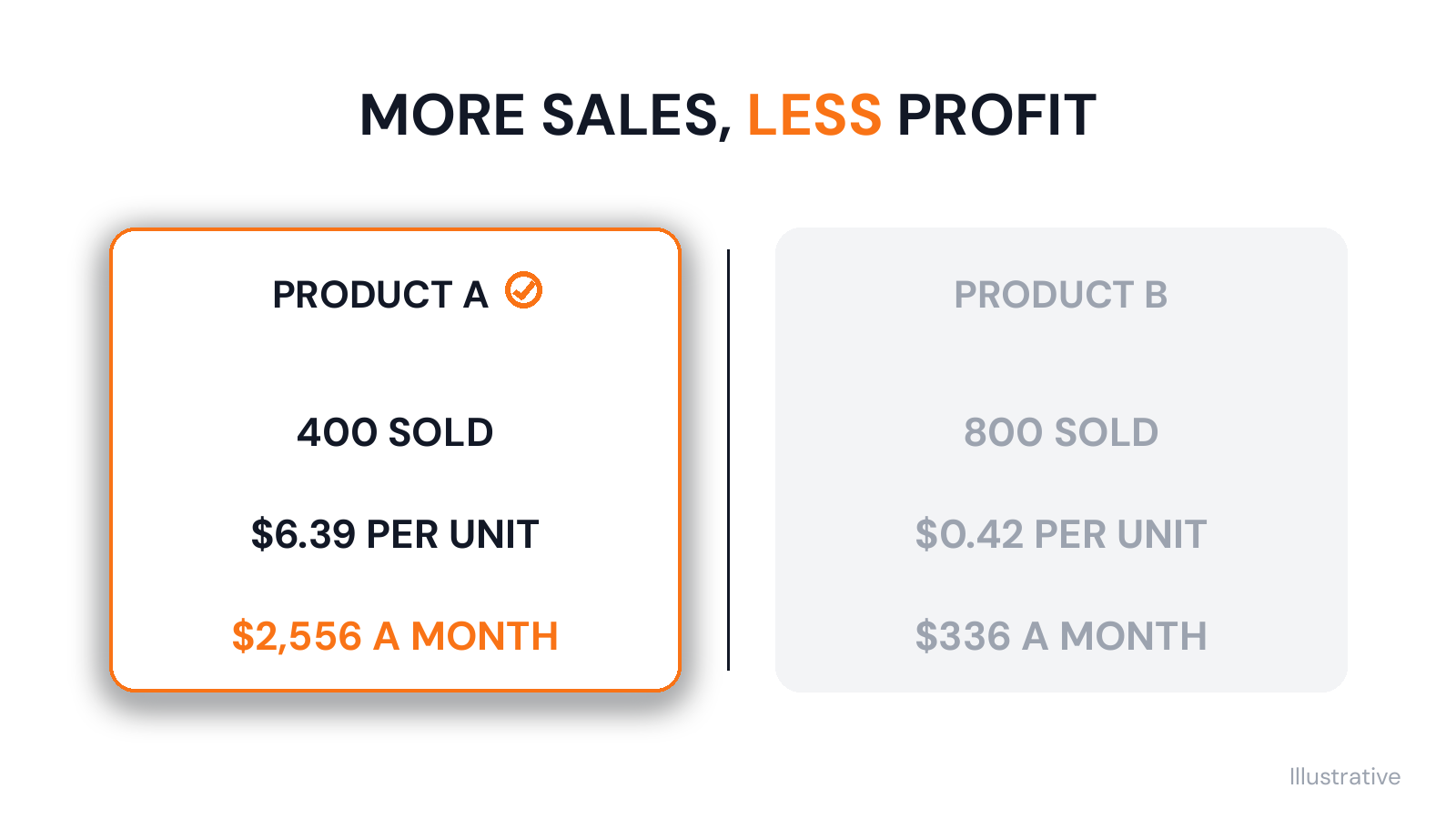
Looking at one product tells you if it makes money. To see where your profit comes from, you need to compare products. Here is our product, now called Product A, next to Product B, which sells twice as many units.
Item | Product A | Product B |
|---|---|---|
Sale price | $29.99 | $19.99 |
Amazon fees | −$11.00 | −$8.40 |
Landed cost | −$8.60 | −$6.50 |
Ads | −$3.00 | −$4.00 |
Returns and coupons | −$1.00 | −$0.67 |
Net profit per unit | $6.39 | $0.42 |
Units sold a month | 400 | 800 |
Sales a month | $11,996 | $15,992 |
Net profit a month | $2,556 | $336 |
Product B brings in more sales, but Product A earns more than seven times as much net profit. B sells for $10 less, but its fees and product cost are only a little lower, and it spends more on ads for every unit. In the holiday weeks, the peak fee brings B down to about $0.09 a unit.
The same check matters if you sell in more than one Amazon marketplace, because one SKU can earn very different amounts in each. Our guide to tracking profit by marketplace explains how.
There are three ways to fix a product like B: raise the price, lower the landed cost or spend less on ads. If none of those works, it may be time to stop reordering it and put that cash into products like A.
Once a month, sort your products by net profit for the month instead of by sales, and start at the bottom of the list. For each product there, decide which of the three fixes you can make before the next order, and write it down. A product that stays at the bottom for two or three months, with no fix that works, is tying up cash you could put into your best products.
Common Mistakes: Missing Costs and Stale Costs
Once you know the full list of costs, most wrong profit numbers come from one of five mistakes.
Leaving out part of the product cost. The supplier invoice is only part of what a unit costs. Freight, duty, prep, labels and inspection belong in it too. Leave them out, and every product looks more profitable than it is. Leave out the product cost completely, and the Amazon payout gets mistaken for profit.
Using old costs. Costs change all the time. Suppliers change their prices, freight rates go up and down, and Amazon changes its fees. In 2026 alone, the cost of FBA fulfilment changed in January with the new fees, in April with the fuel surcharge and in October with the peak fees. So a costing sheet set up last year is now out of date for every FBA product, even if nobody has touched it.
Counting ads the wrong way. Ad reports show cost per click and the sales that came from ads. Profit needs a different number: total ad spend for the product divided by every unit sold. A product with a good-looking ad report can still lose money once the spend is shared across every sale.
Treating variations as one product. A small and a large size of the same item can pay very different FBA fees, because the fee depends on size and weight. If you work out profit once for the whole listing, one size can lose money while the others hide it.
Ignoring returns and lost units. Returns, damaged units and stock that goes missing in a warehouse are all real costs. Amazon reimburses some lost and damaged units, but some of that money only comes back if someone checks and files a claim. Units that are never claimed come straight out of your profit.
An Amazon profit calculator is useful before you list a product, but it gives you one number on the day you use it. Most of these mistakes happen later, when a cost changes in one place and not in the others.
Why Spreadsheets Break
Most sellers start with a costing sheet, and for a small catalog it works. We ran our own business this way for years. We had a costing sheet just to work out margins and the P&L, and someone filled it in from Seller Central reports, supplier invoices and ad exports.
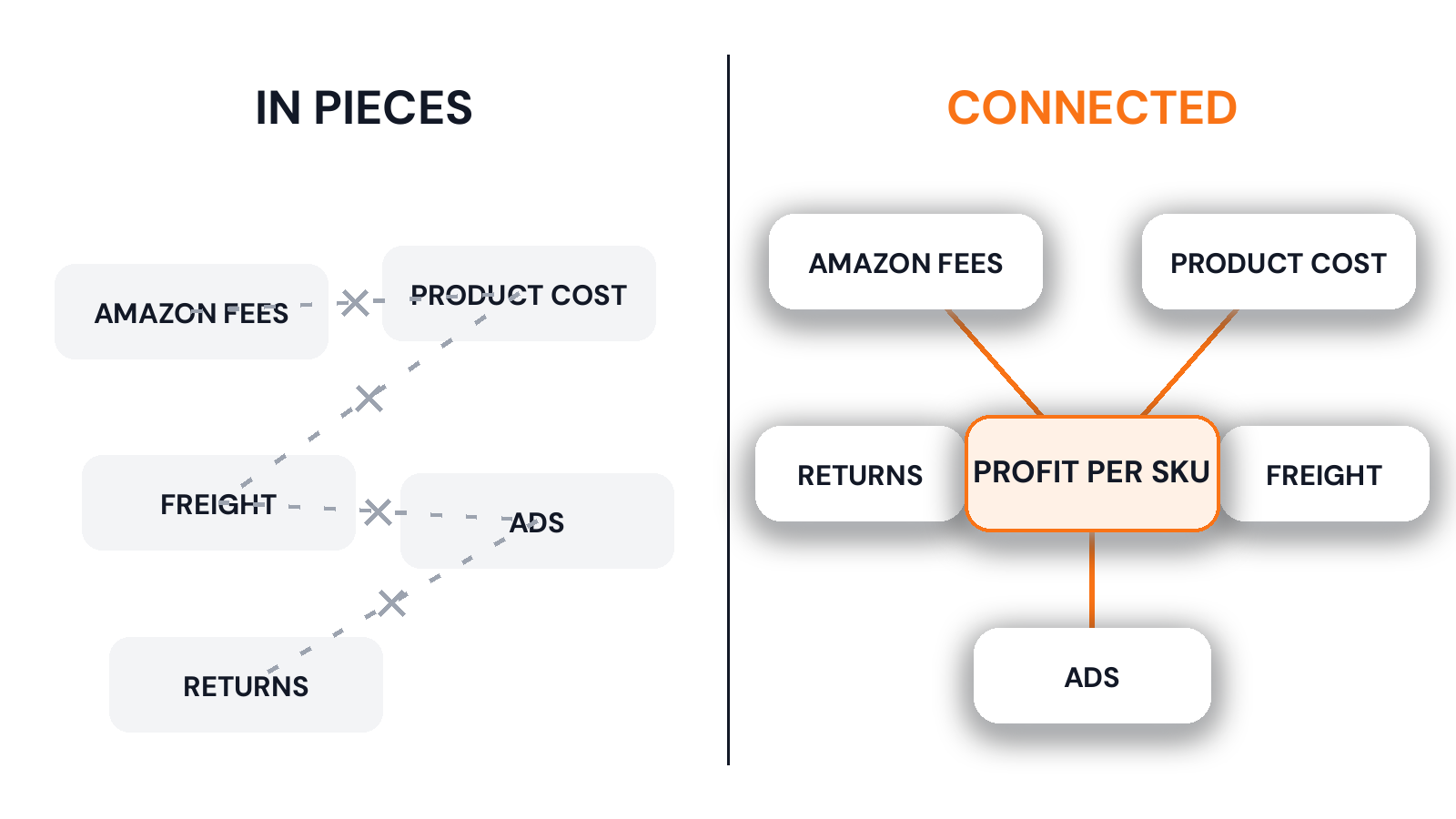
The trouble starts as the business grows. Every number in the sheet is a copy of a number that lives somewhere else, so the sheet is only as current as the last time someone updated it. When one of our suppliers raised a price, it took days to reach every team, and we kept buying at the old cost until it did.
Other problems follow. The sheet usually depends on one person, so it falls behind the week that person is away. Formulas get overwritten by mistake. Different teams keep their own copies, and buying, finance and ads each end up with a different number for the same product. Because the sheet is updated once a month, you see real profit after the month is over, often after you have placed the next order.
None of this is anyone's fault. A spreadsheet has no connection to Amazon or to your purchase orders, so someone has to bring every number in by hand.
How to See Amazon Net Profit per SKU in One System
Whatever system you use, it needs to do five things to show true profit per SKU:
- Connect to Amazon, so fees, returns and payouts come in on their own.
- Take landed cost from the purchase order, so freight and duty are always counted.
- Track ad spend for each product.
- Show profit on each order, instead of only at the end of the month.
- Update the margin, P&L, stock value and next purchase order when one cost changes.
That is what we built Sellerverse to do. It is built by the team behind Leverify, and it runs our own business every day. Sellerverse shows profit on every order the day it ships, with Amazon fees and landed cost already on each order. You can set your own costing and margin formulas, so the numbers follow the way you already work. You can also ask Seller Navigator questions in plain English, such as "Which products are losing money on ads?"
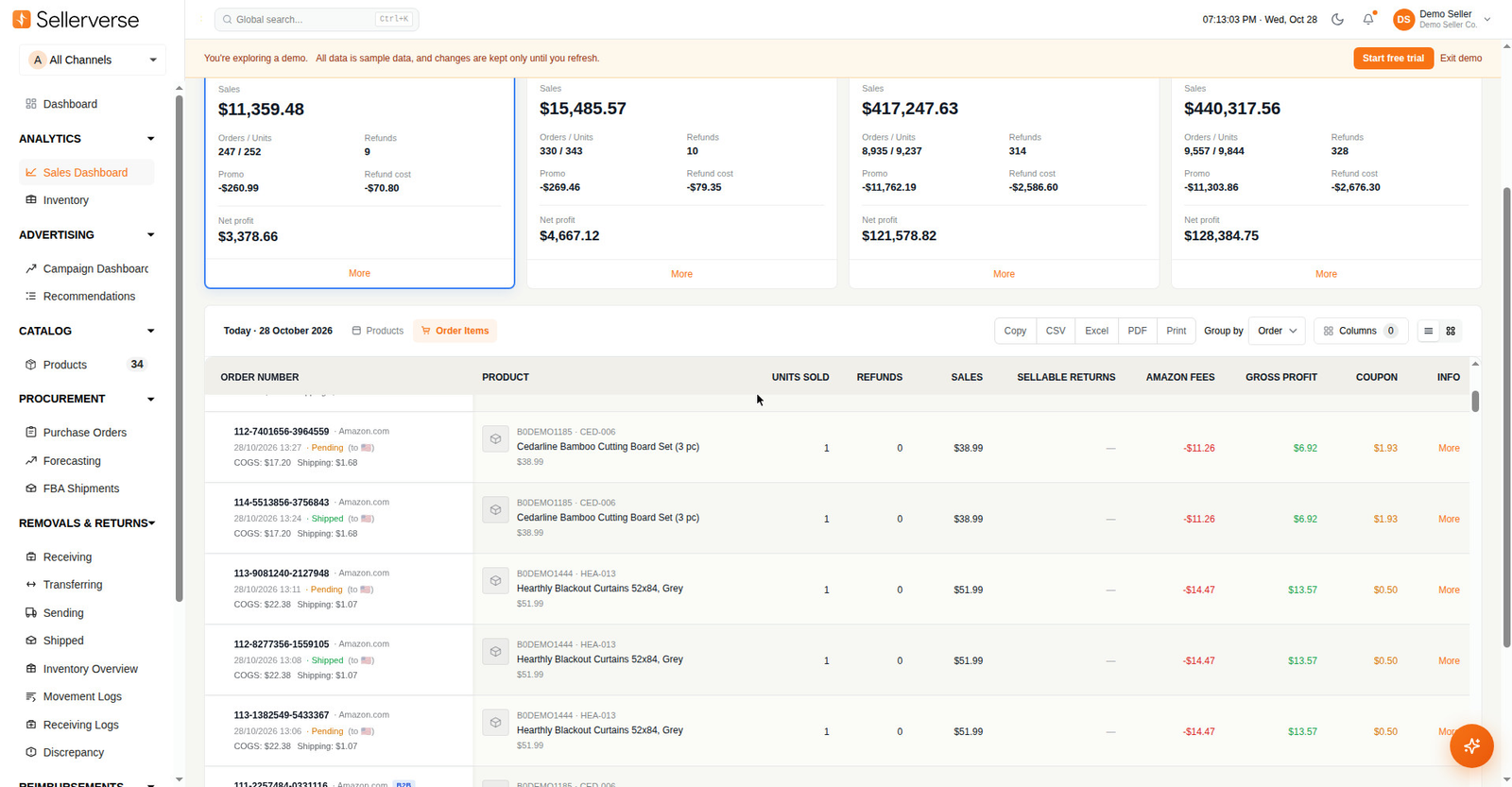
It does take some setup. You connect your Amazon account, add your product costs and invite your team, and the numbers are only as good as the costs you enter. You can see per-order profit in the demo before you decide. Once your costs are in, you can see which products earn their place before you reorder them.
Know Your Amazon Net Profit per SKU before You Reorder
The reorder is where this number matters most. Every time you buy more of a product, you spend cash on the belief that it makes money. With your Amazon net profit per SKU in front of you, you can check that belief against the full cost of every unit before you pay the supplier.
We built Sellerverse after years of running our own business in pieces, with that number spread across sheets and reports. See how Sellerverse runs the whole business from one connected platform, and when you are ready, start your 14-day free trial.